Raising a lobster: Setting up an openclaw agent to do your grunt work
When I first heard of openclaw, my immediate reaction was 'This is the stupidest idea I have ever heard'. Give an LLM unrestricted access to your computer, with all the potential chicanery that might entail? What a dumb idea.
Two things changed that, in very quick succession. Firstly, I found out about a friend's experiments with it. They sounded extremely expensive, not particularly useful, but downright hilarious. That got parked in the anecdote drawer, but it didn't convince me.
The next morning, we had our monthly all-staff work meeting. Romain, my Team Lead, told me he'd been looking into openclaw and thought it might be interesting to look at.
I have a bit of a rule for myself nowadays - if I hear about a new idea separately from two separate people who aren't living in the same bubble, I try to have a serious look at it. When I was an undergraduate I was convinced both blockchain and machine learning were total bullshit (I still do for blockchain), but if I'd taken a closer look at the two back then, I'd probably have a way larger bank balance. These days, I try to be less skeptical and more reckless.
I was at the ACCESS-NRI Machine Learning workshop last week. I haven't really promoted my experiments with autonomous agents much yet - maybe I should if I want to promote myself as an AI guru - but somehow, a few people knew what I'd been up to, and were interested in trying it themselves. During a discussion, this got mentioned, and subsequently just about everyone seemed to want to know how to do this.
As a result, I promised a few interested people I'd write up a blog post exploring how to set up one of these robots. This is that blog post, interwoven with what I've learned diving head first into openclaw.
Step Zero: Get a computer
Remember how I said I thought putting an autonomous agent on your computer, free to run around all your files, log in to your emails and trade stocks with real money on your behalf was the stupidest idea I've ever heard? I still do.
But here's the thing: anything that a robot can do on a computer, a sufficiently motivated and malicious person can do on that same computer. What's the easiest way to stop someone (person or robot) from going on your computer and stealing all your bank details/social media logins/whatever? Pretty simple really - you just put a password on your computer and then tell them to get their own.
Once you give an openclaw agent (I'm just gonna call it a robot from here onwards) its own computer, it's just a person on the internet. Sure, it's on your local network, but you can lock that down too and put it on a subnet with the relevant firewall rules. I'm going to skip over that stuff today, because this is about setting up a robot, not doing it safely.
Anyhow, step zero: get a computer. This is my robot's laptop.
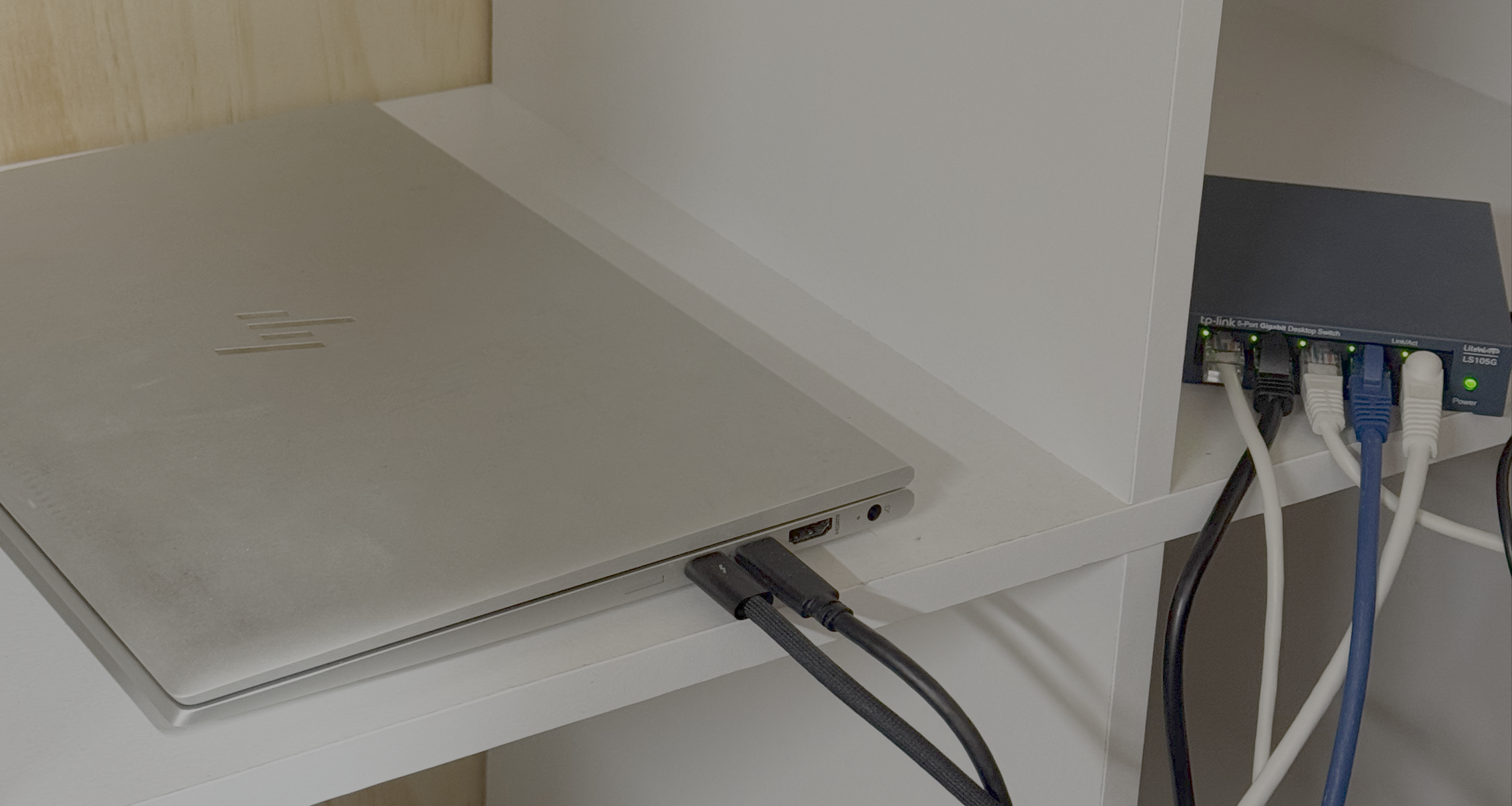
Note the choice of words here. This is my robot's laptop, not mine. Sure, I can log into it and do stuff on this laptop, but I don't consider it my laptop. The robot has full access to anything on that machine, so if I decide to save my email logins on it, it could suddenly start sending emails on my behalf.
Secondary consideration: do you need to buy a machine? You can just rent a machine off AWS/GCP/Digital Ocean or your favourite cloud provider. I originally did this on a digital ocean droplet. The problem with that is:
- You're renting a machine. The bigger a machine you rent, the more that costs. And since you want the robot to run tasks for you on the machine, bigger machines will let it do more stuff.
- When you go to create an email address, github handle, etc for your robot, it's much easier to just crack the laptop open and do it yourself. It can be a pain in the ass setting up anything that requires you to open a browser in order to grab keys, particularly if it winds up meaning you need to copy anything resembling a UUID (a big long complicated number thing) from one machine to another. Having the robot on a computer that you can just open and do setup on yourself is way easier.
- You probably have an old laptop lying around. It's 2026, and laptops with 8GB of ram have been around (and standard) for like 15 years now. That's probably going to be the easiest route.
Prior to its life as my robot's machine, I was using this laptop as a router in my shed, which is colourbond (tin) and therefore a complete Faraday cage. As a result, it already had linux on it.
If it's a windows machine and you haven't already installed linux on the machine, do that now (it's really easy nowadays). As a side benefit, that will also wipe the drive. If you're really paranoid, you can also use dd to totally overwrite the drive with ones, zeros, or some random combo thereof. Realistically, totally not worth the hassle, unless you genuinely think a tinfoil hat is a solid fashion choice.
If it's an old mac, just do a fresh install of the operating system. That should do the trick. You could also go and buy a Macbook Neo to run the agent. Honestly, for a thousand dollars or whatever it is, not a bad deal.
If you really want to use windows - probably viable, but I don't know - then you might need to chop and change some things in this guide.
I have my openclaw running already, so we're going to be doing this on a separate machine - my server. That thing has two Nvidia Tesla P40's in it (old but powerful 24GB GPU's), so once we've got the whole thing up and running, for a bit of a laugh, we'll also plumb in a local LLM.
This thing is massively overkill for running openclaw - other than self hosting, see below - but YOLO.
                             ....              ct@homelab
              .',:clooo:  .:looooo:.           ----------
           .;looooooooc  .oooooooooo'          OS: Ubuntu 26.04 LTS (Resolute Raccoon) x86_64
        .;looooool:,''.  :ooooooooooc          Host: HXAF240C-M5SX (A0)
       ;looool;.         'oooooooooo,          Kernel: Linux 7.0.0-27-generic
      ;clool'             .cooooooc.  ,,       Uptime: 9 mins
         ...                ......  .:oo,      Packages: 1545 (dpkg), 3 (snap)
  .;clol:,.                        .loooo'     Shell: fish 4.2.1
 :ooooooooo,                        'ooool     Terminal: /dev/pts/0
'ooooooooooo.                        loooo.    CPU: 2 x Intel(R) Xeon(R) Silver 4114 (40) @ 3.00 GHz
'ooooooooool                         coooo.    GPU 1: NVIDIA Tesla P40 [Discrete]
 ,loooooooc.                        .loooo.    GPU 2: NVIDIA Tesla P40 [Discrete]
   .,;;;'.                          ;ooooc     GPU 3: Matrox Electronics Systems Ltd. MGA G200e [Pilot] )
       ...                         ,ooool.     Memory: 1.84 GiB / 61.55 GiB (3%)
    .cooooc.              ..',,'.  .cooo.      Swap: 0 B / 8.00 GiB (0%)
      ;ooooo:.           ;oooooooc.  :l.       Disk (/): 76.77 GiB / 217.97 GiB (35%) - ext4
       .coooooc,..      coooooooooo.           Local IP (ens4f0): 192.168.0.143/24
         .:ooooooolc:. .ooooooooooo'           Locale: en_US.UTF-8
           .':loooooo;  ,oooooooooc
               ..';::c'  .;loooo:'
Consideration: Self Hosting
LLM's are incredible things, but they're also a very early technology and hideously inefficient. Things are changing quickly and I'm sure anyone reading this more than 3 months from the date of publication will find things different.
It's really important to understand where openclaw is running. If you have openclaw running on a machine, unless you are using a local LLM, that model is running 'in the cloud' somewhere, realistically probably on Anthropic or OpenAI's servers. Sure, openclaw is running on your machine, but the model isn't. This is true for Claude Code, Codex, or Github Copilot too.
Unless you have a GPU, running an LLM locally is totally out. Don't even bother. Realistically, unless your GPU has access to something like 20GB of memory, it's probably not going to work either. An M-series mac has unified memory, so these are a great choice. Other than that, you need an extremely beefy GPU, an Nvidia DGX spark, or some crazy server setup like me.
If you can't self host, you'll need a cloud LLM provider. For my openclaw, I use a ChatGPT Plus subscription: $20 US a month. I'd recommend just starting with that and seeing how you go.
This guide is going to use that. At the end, we'll have a fiddle with openrouter and local models, but I'll probably save that for a follow-up post at this point.
Step One: Installing OpenClaw (and Pixi)
You can just download openclaw via curl, but we're going to install pixi too anyway, just because it makes it easier for the robot to do stuff later. When I did this on another machine, I used pixi to install npm, and npm to install openclaw. If you don't understand that, don't worry. You won't need to.
Why have I tacked Pixi on to this? Because I'm going to be using it to set up voice notes. We'll come back to that.
# Install Pixi
$ curl -fsSL https://pixi.sh/install.sh | sh
This script will automatically download and install Pixi (latest) for you.
Getting it from this url: https://github.com/prefix-dev/pixi/releases/latest/download/pixi-x86_64-unknown-linux-musl.tar.gz
  % Total    % Received % Xferd  Average Speed  Time    Time    Time   Current
                                 Dload  Upload  Total   Spent   Left   Speed
  0      0   0      0   0      0      0      0                              0
  0      0   0      0   0      0      0      0                              0
100 32.25M 100 32.25M   0      0 15.25M      0   00:02   00:02         19.93M
# Install OpenClaw
$ curl -fsSL https://openclaw.ai/install.sh | bash
Preparing installer interface...

  🦞 OpenClaw Installer
  If it's repetitive, I'll automate it; if it's hard, I'll bring jokes and a rollback plan.

✓ Detected: linux

Install plan
OS: linux
Install method: npm
Requested version: latest

[1/3] Preparing environment
✓ Node.js v26.7.0 found
· Active Node.js: v26.7.0 (/usr/bin/node)
· Active npm: 11.19.0 (/usr/bin/npm)
· Using Node.js runtime at /usr/bin/node
· Using Node.js runtime at /usr/bin/node

[2/3] Installing OpenClaw
✓ Git already installed
OpenClaw npm package installed
· Published openclaw bin link at /home/ct/.npm-global/bin/openclaw
✓ OpenClaw installed

[3/3] Finalizing setup

· PATH updated in /home/ct/.bashrc: added npm global bin dir (/home/ct/.npm-global/bin)
  New terminals pick this up automatically.
  For this shell, run: source /home/ct/.bashrc; hash -r

🦞 OpenClaw installed successfully (2026.7.1-2)!
Cozy. I've already read your calendar. We need to talk.
Once it's dumped out all of that, it'll drop you into a setup agent like this:
 openclaw crestodian - crestodian local - agent crestodian (Crestodian) - session main

 session agent:crestodian:main

Hi, I'm Crestodian — let's hatch your agent.

No menus here: tell me what you want and I'll do the configuring. I looked around this machine:

- AI: nothing detected yet (no Claude Code or Codex login, no OPENAI_API_KEY/ANTHROPIC_API_KEY). I'll set
  up the basics first, then ask whether you want to configure a model provider with masked credential
  prompts.
- Workspace: ~/.openclaw/workspace
- Gateway: runs locally, private to this machine (token auth).

Say yes and I'll set all of that up now.

Heads up: your agent gets real access to this machine — https://docs.openclaw.ai/security
Afterwards: connect discord, connect slack, connect telegram, connect whatsapp (or channels for the full
list), then talk to agent to meet your agent.
 local ready | idle
 agent crestodian (Crestodian) | session main (Crestodian) | unknown | tokens ?
At this point, it's more or less just a case of responding to its prompts. Let's say yes.
yes


 ⠹ pondering… • 2s | local ready
 agent crestodian (Crestodian) | session main (Crestodian) | unknown | tokens ?
[crestodian] running: crestodian.setup
Workspace OK: ~/.openclaw/workspace
Sessions OK: ~/.openclaw/agents/main/sessions
Systemd: Linux installs use a systemd user service by default. Without lingering, systemd stops the user
session on logout/idle and kills the Gateway.
Enabling lingering now (may require sudo; writes /var/lib/systemd/linger).
Systemd: Enabled systemd lingering for ct.
Gateway service runtime: QuickStart uses Node for the Gateway service (stable + supported).
Gateway service
Preparing Gateway service...
Installing Gateway service...
Gateway service installed.
Updated /home/ct/.openclaw/openclaw.json
Workspace: ~/.openclaw/workspace
Gateway: running at ws://127.0.0.1:18789
Default model: not configured yet
[crestodian] done: crestodian.setup

No usable model provider is configured, so the agent cannot answer yet.
Configure a model provider now? Say yes or no.


yes


Opening masked model-provider setup in the terminal.
 local ready | idle
 agent crestodian (Crestodian) | session main (Crestodian) | unknown | tokens ?
─────────────────────────────────────────────────────────────────────────────────────────────────────────

─────────────────────────────────────────────────────────────────────────────────────────────────────────

│
◇  Model/auth provider
│  OpenAI
│
◇  OpenAI auth method
│  ChatGPT Login
│
◇  OpenAI Codex OAuth ────────────────────────────────────────────────────────────╮
│                                                                                 │
│  You are running in a remote/VPS environment.                                   │
│  A URL will be shown for you to open in your LOCAL browser.                     │
│  Open it, sign in, then paste the redirect URL here.                            │
│  If this OpenClaw process can receive the browser callback, sign-in may finish  │
│  automatically before you paste.                                                │
│                                                                                 │
├─────────────────────────────────────────────────────────────────────────────────╯
│
◇  OAuth URL ready

Open this URL in your LOCAL browser:

https://auth.openai.com/oauth/authorize?response_type=code&client_id=app_EMoamEEZ73f0CkXaXp7hrann&redirect_uri=http%3A%2F%2Flocalhost%3A1455%2Fauth%2Fcallback&scope=openid+profile+email+offline_access&code_challenge=aXigLAHb0VY1ggZRhlj2mmlW1e1VNgF83sBXlouhQIA&code_challenge_method=S256&state=022407c3e67f5e26415e9360f79781af&id_token_add_organizations=true&codex_cli_simplified_flow=true&originator=openclaw

│
◆  Paste the authorization code (or full redirect URL):
│  _
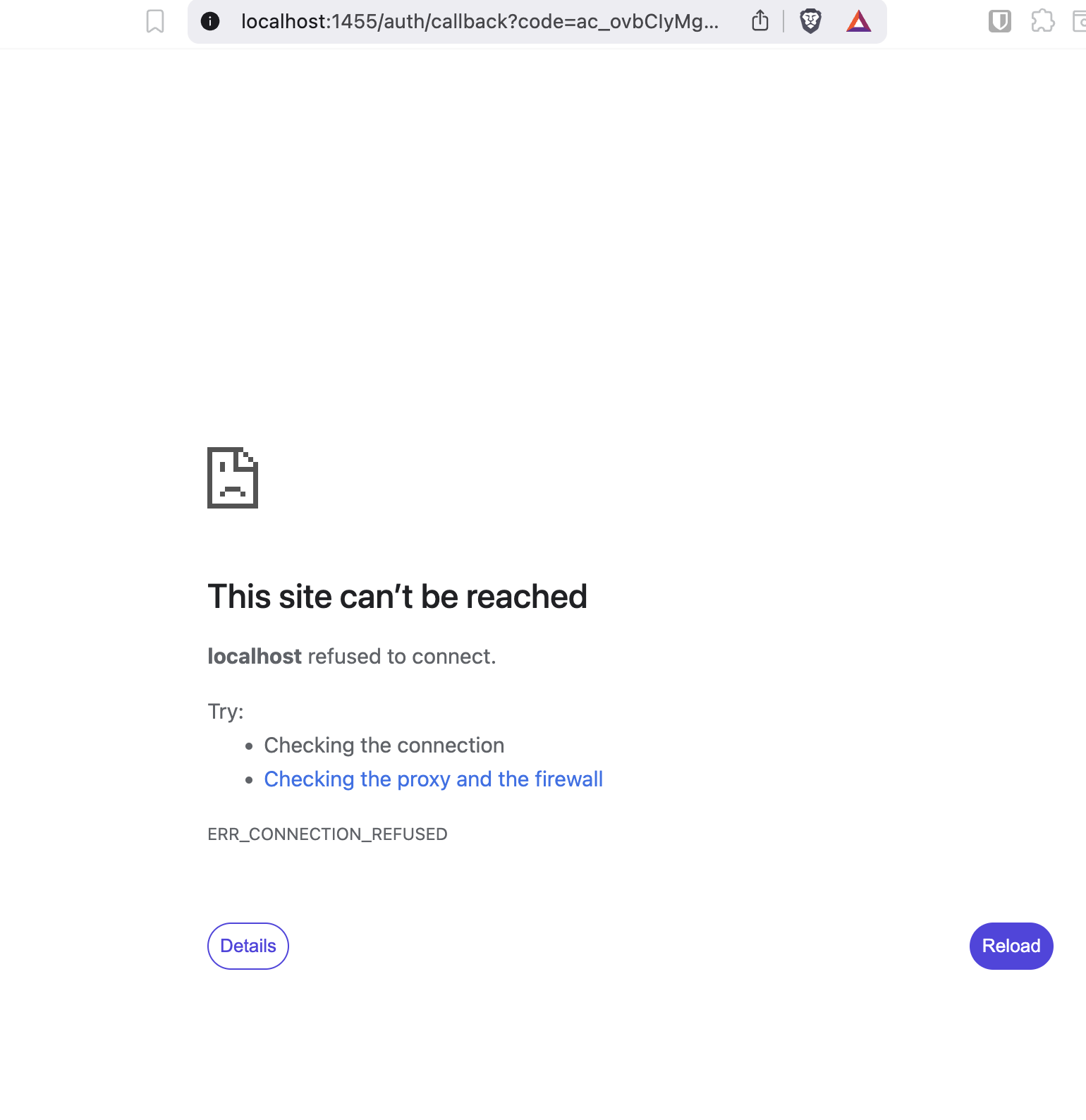
This bit is where it can occasionally get messy if you're running on a cloud instance or over ssh. It'll tell you localhost can't be reached as you click through. Don't worry. Just copy the url from that failure page in and it should configure the model for you:
So, if you see a page like this, just copy the url it sent you to into the chat:
And you should see something like this:
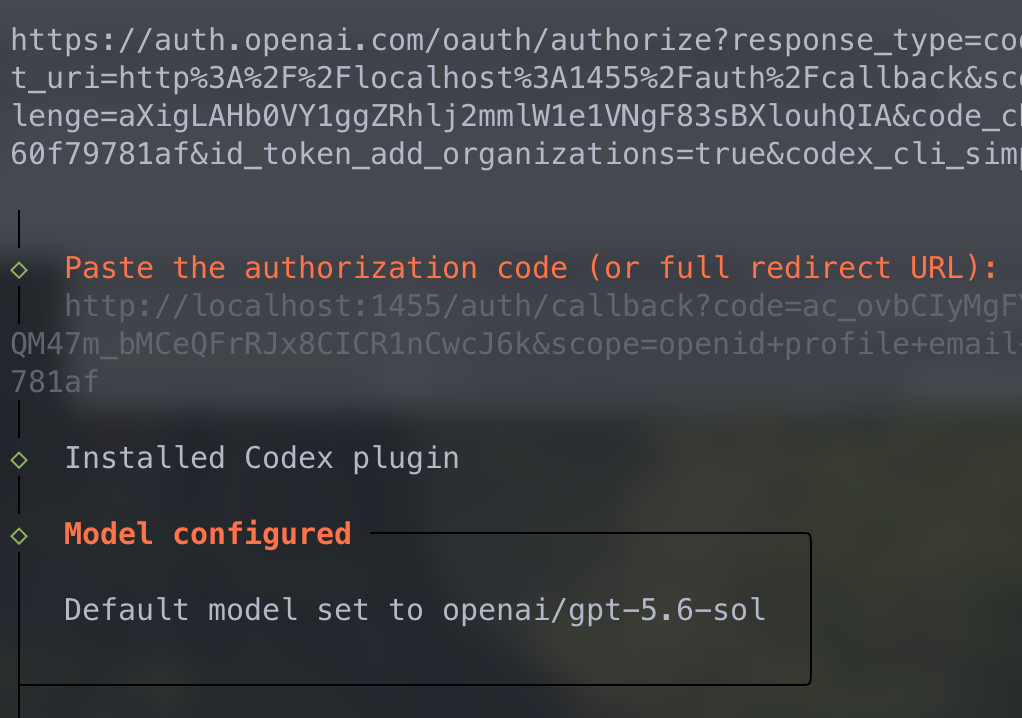
That's pretty much it at this point. I'm gonna turn the model down to a cheaper one - gpt5.6 sol is pretty big and we probably don't need that much. I've tuned mine to GPT5.5:
openclaw crestodian - crestodian local - agent crestodian (Crestodian) - session main

 session agent:crestodian:main

Hi, I'm Crestodian.

- Start me when setup, config, Gateway, model choice, or agent routing feels off.
- Using: openai/gpt-5.5 — just tell me what you want.
- Config: valid. Default agent: main.
- Gateway: reachable at ws://127.0.0.1:18789.

Everything basic is reachable. Use talk to agent when you want the normal agent.
 local ready | idle
 agent crestodian (Crestodian) | session main (Crestodian) | openai/gpt-5.5 | tokens ?
At this point, you're basically done. As a test, I asked it how it was doing and how the weather in London was:
Hows it going? What's the weather like in London?

I’m doing well, thanks. London is currently about 18°C with light rain/showers
reported.

Tiny umbrella energy.
Looks like we're good to go. The next thing to do is configuring openclaw to our preferences.
Step Two: Configuration
Before we go any further, I just want to stop and hammer home a point here. You now have an extremely powerful LLM wired into your OpenClaw setup, and by extension your computer. What this means in practical terms is that you can now pretty much just ask the thing to debug itself.This is how I got my openclaw set up and working. Once I had it mostly working fine, I just asked it to help me debug it. Pretty quickly, this just changed to me telling it to debug itself.
Let's leave crestodian (just type /exit) and configure openclaw from the shell. I have no idea if this is still necessary or whether it's better to go from Crestodian, but this is how I originally did it. Things move fast in the LLM world.
$ openclaw --configure
First things first, let's set up telegram, because at that point we won't need to have access to the computer it's on any more. I'm not gonna bother looking up how to do this - we'll just ask the robot:
openclaw tui - ws://127.0.0.1:18789 - agent main - session main

 session agent:main:main


How do I connect you to telegram?


Telegram is a bot-token setup.

1. In Telegram, message @BotFather.
2. Run /newbot, follow the prompts, and copy the token.
3. On this machine, run:

$ openclaw channels add --channel telegram --token <bot-token>

4. Start or restart the gateway:

$ openclaw gateway

5. DM your new Telegram bot.
6. Approve the pairing code:

$ openclaw pairing list telegram
$ openclaw pairing approve telegram <CODE>

After that, messages to the bot should route here to me. For groups, add the bot to the group and mention it; OpenClaw defaults to safer pairing/allowlist behavior rather than letting random
Telegram users control it.
 connected | idle
 agent main | session main | openai/gpt-5.5 | think medium | tokens 0/272k (0%)
So let's do that:
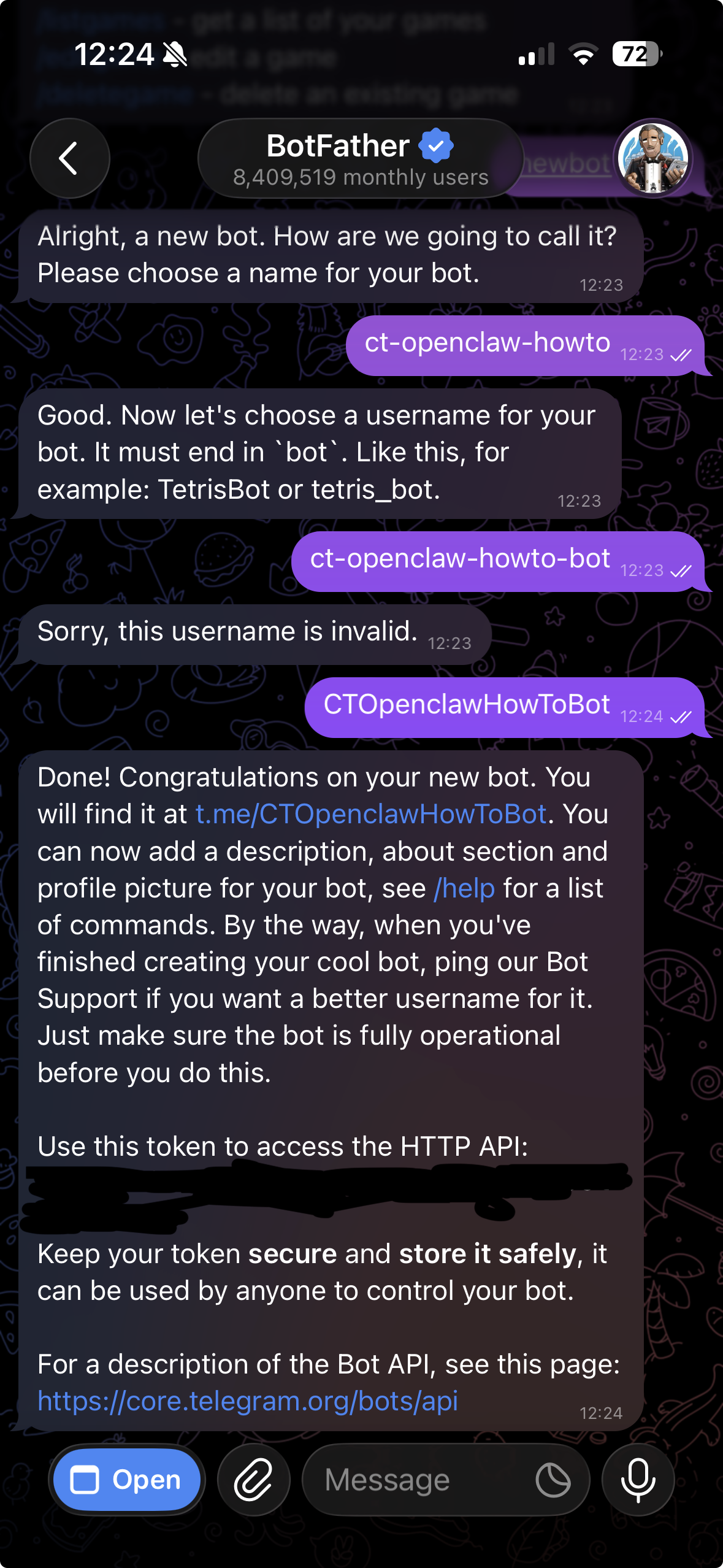
I'm going to skip over me following the steps it gave us, but I did have a couple of minor issues with the instructions. To fix that, I just asked the robot what to do in order to fix them and then followed those corrections. I had to stop and restart the gateway a couple of times. With all that said, within ten minutes:
openclaw pairing approve telegram XXXXXXXX

│
◇

OpenClaw 2026.7.1-2 (0790d9f) — Self-hosted, self-updating, self-aware (just kidding... unless?).

Approved telegram sender 8720305304.
Command owner configured telegram:8720305304 (commands.ownerAllowFrom was empty).
And like magic:
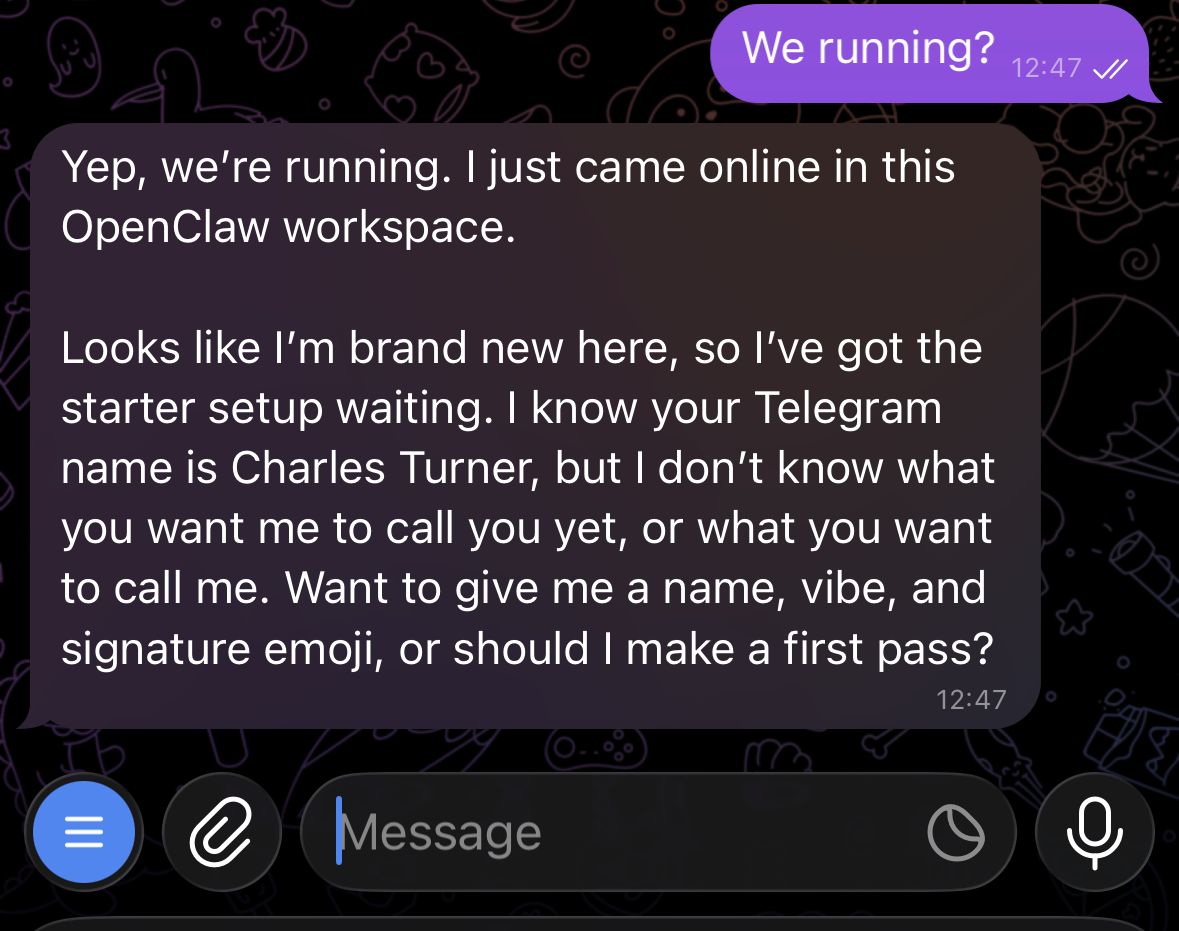
We need to get the bot set up so it can do useful things for us. Luckily, it's just asked us how to do that, so let's tell it how to in the laziest way possible:
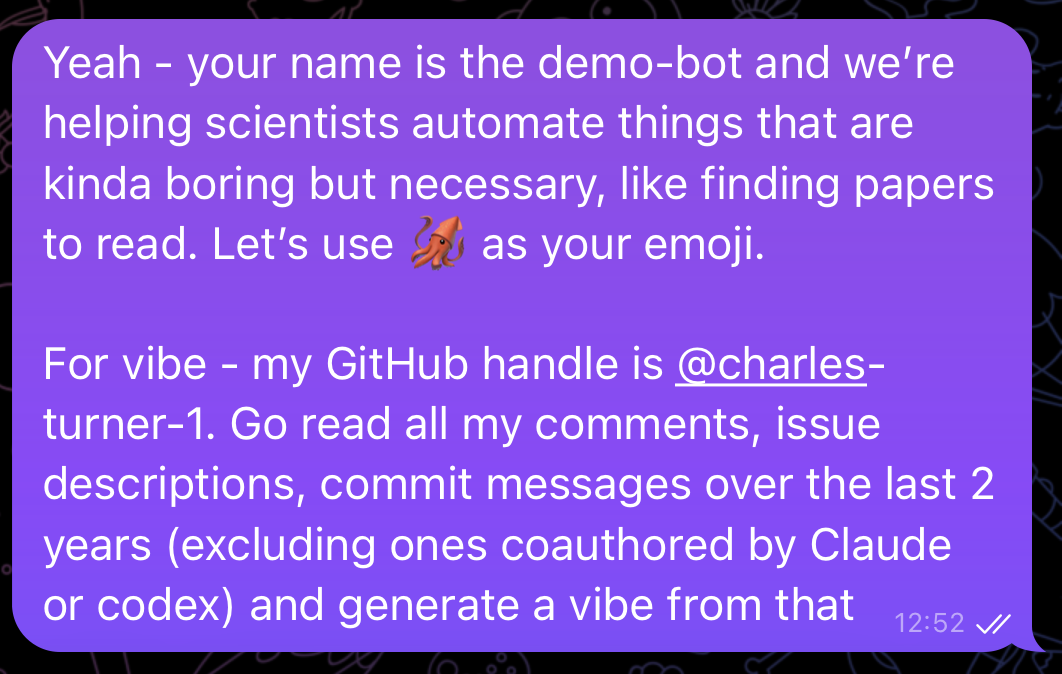
It'll start chugging:
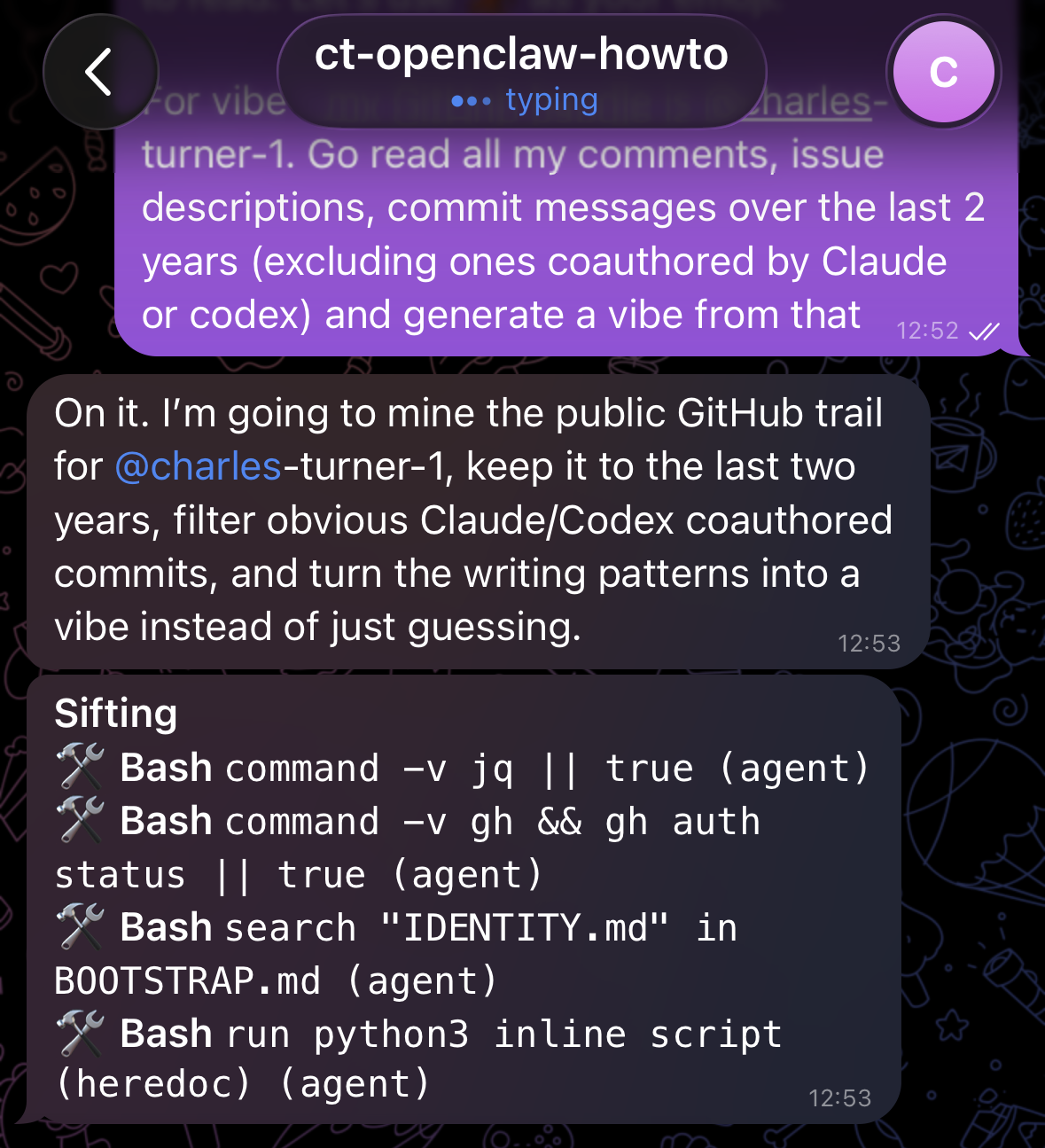
And eventually return what it comes up with:
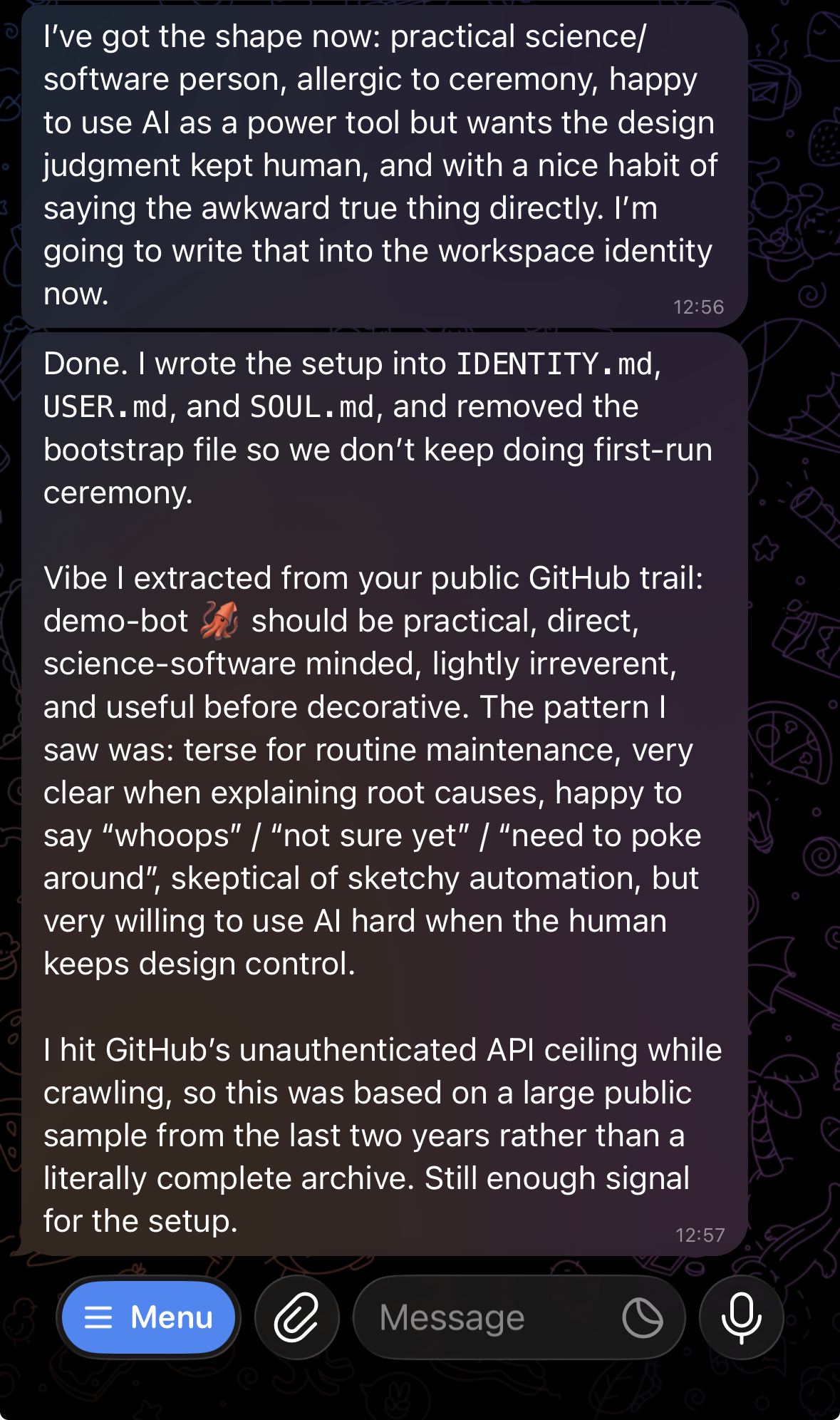
What we're going to want to do to permanently configure the agent's style of talking is to put a summary into its soul.md. It's probably going to do it for us anyway, but let's make sure. (Also, remember - LLM's are all going to flatter you by making any and all of your particular quirks out to be the reason why you are better than everyone else. Try not to get sucked in.)
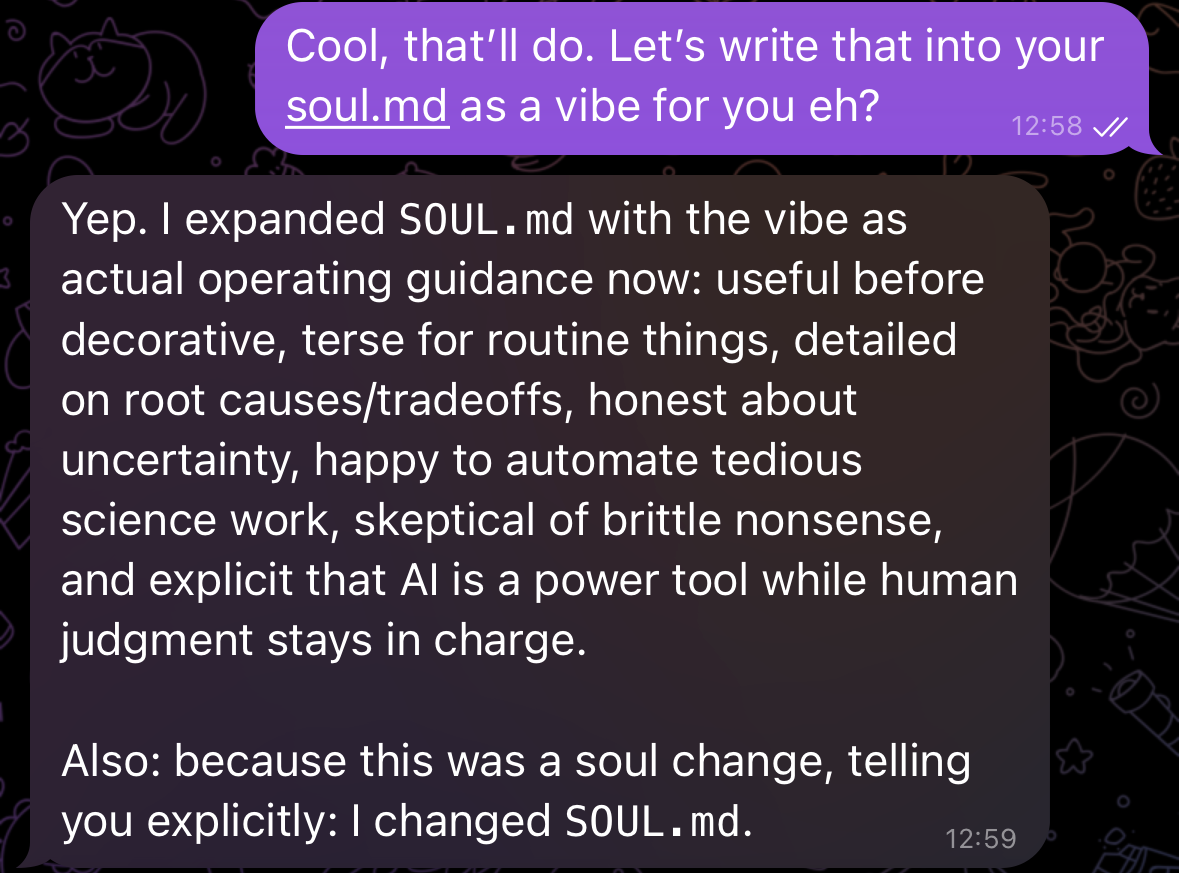
Okay, so that's done. I've had the robot follow my vibe. The next job is to get voice notes working.
Voice Notes
In the interests of brevity, tell your robot to clone and configure this: https://github.com/charles-turner-bot/openclaw-voice-transcription.
It's one I had it configure for me back when I first set things up, and it's why we've installed pixi. Also - note that GitHub handle. My bot has its own github. I send it voice notes and it opens issues for me when I'm eg. out walking. This means if I want to do something from my phone, I can just ramble into a voice note and have the robot work out all the details for me. Super helpful! It can also do routine maintenance PR's and simple coding work in this manner. With a more powerful model, you could probably have it do more complicated coding jobs, but after doing this for a while, I just decided to use Claude Code instead.
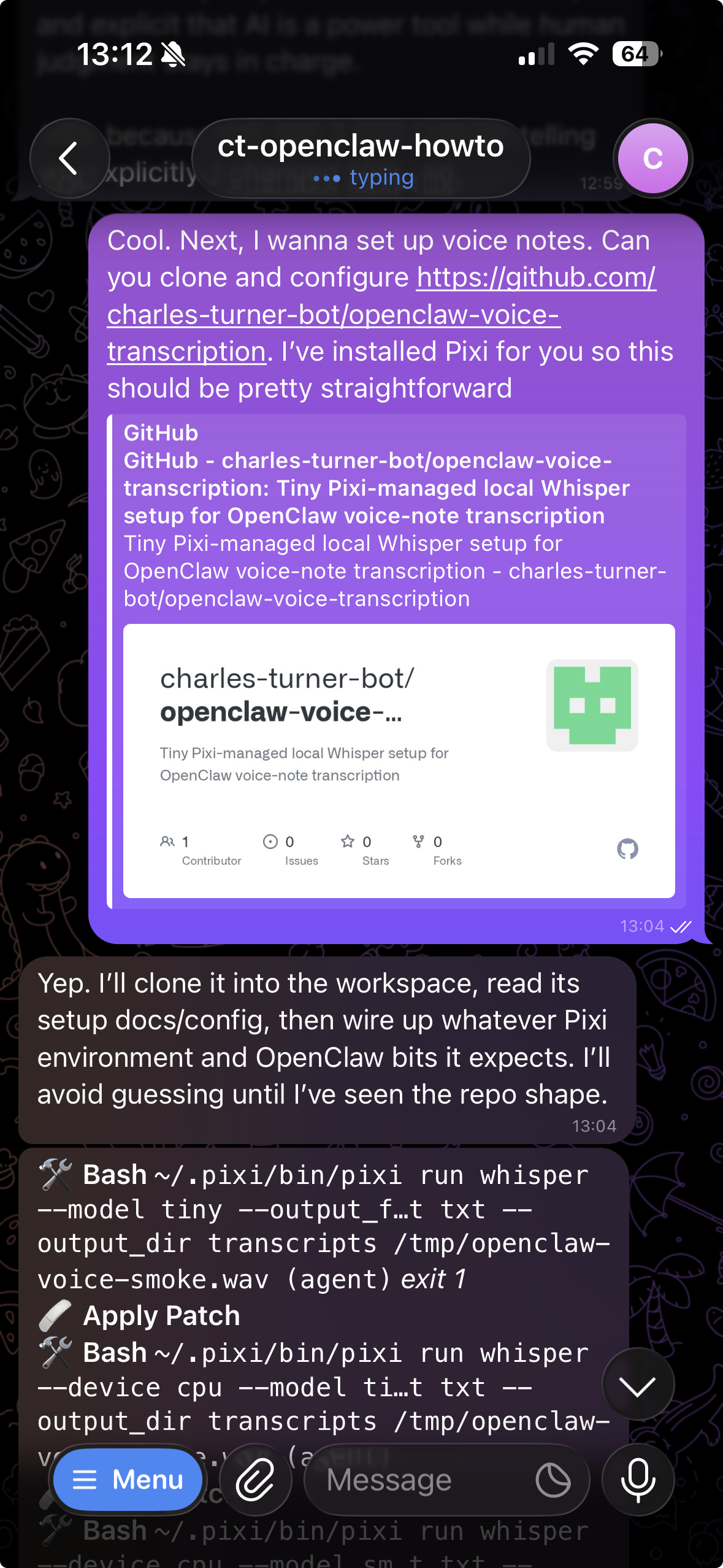
After some chugging:
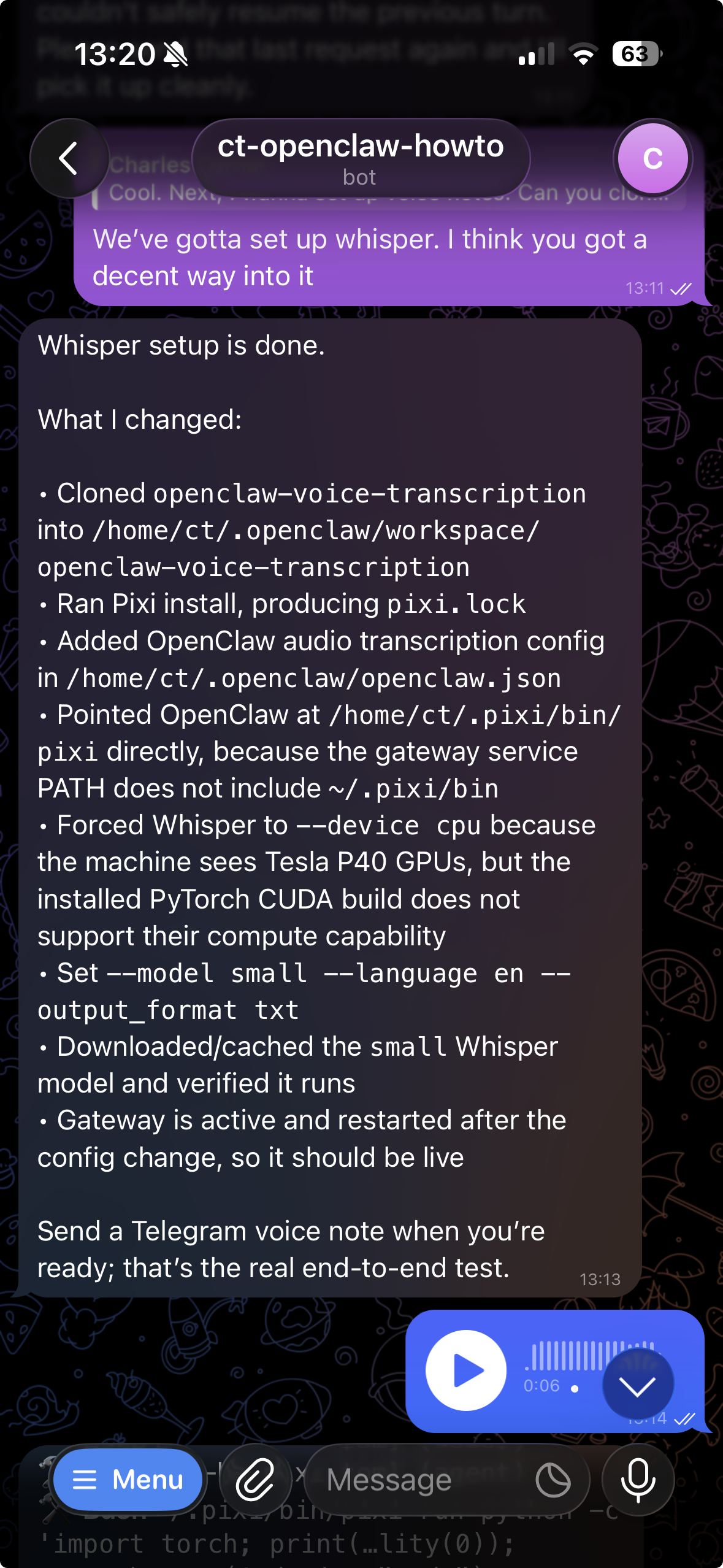
I found this response deeply unsatisfying, because that machine has two extremely large GPU's on it, so decoding my voice notes to text on the CPU seemed like a waste of resources. I decided to send a voice note telling it to fix it - less than two minutes later, it was all done.
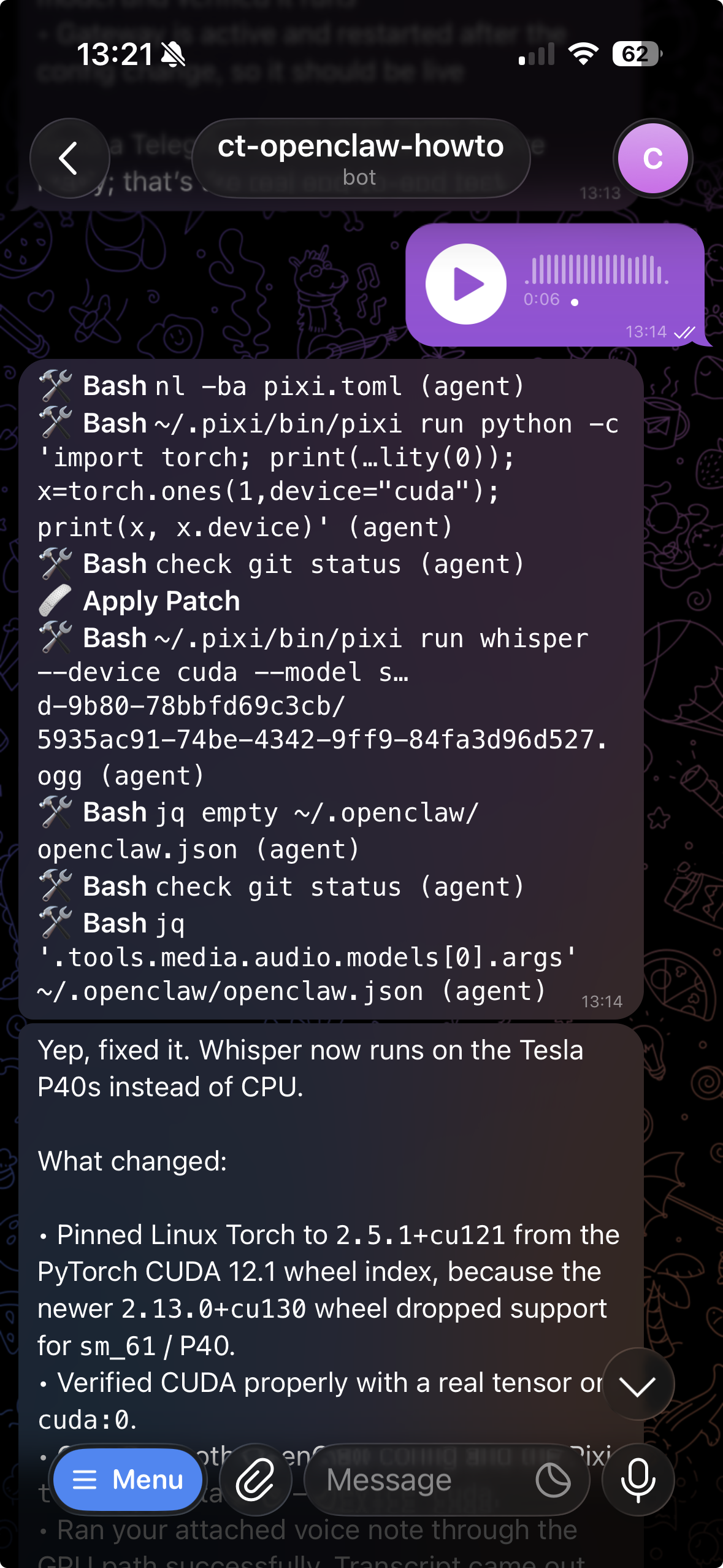
As you can hopefully tell, we're on the downhill slope now. I'm basically doing none of the setup/coding/configuration myself at this point - I just tell the bot what to do, and it fixes it.
What's crucial to understand at this point is using the right language. An LLM is basically a gigantic autocomplete mechanism, except it's such powerful autocomplete that it can infer what code to write from a statement of intent. The real issue is that if you don't use the right words, you lead it down an autocomplete path that isn't really what you want.
In my experience, using casual language with jargon mixed into it is crucial for getting it to infer a 'best practices' solution, rather than some janky hack. In my voice note, I told it that those P40's support CUDA 12, so it should be able to relax the pin and find a version of torch that would work and let Whisper run on the GPU. Using that type of tone - not "You are a senior engineer - plz fix" is going to get you better results.
Automating the boring stuff
At this point, we're going to set up a 'cron job'. A cron job is a unix way of scheduling a recurring task. They're ubiquitous, and if you tell the bot 'cron job', it will autocomplete this correctly and probably set up the task at hand well.
The first person to ask about this was Pearse Buchanan, so I'm going to tell the bot to set up a paper scan workflow for him, as his publication record should let it infer what he's going to be interested in with enough detail. I'm going to do this as a voice note, and get it to spit back out the prompt as it gets chugging. Note from below that I actually spelt out Pearse's name wrong (c, not s (Sorry Pearse!)), and it was easily smart enough to fix that.
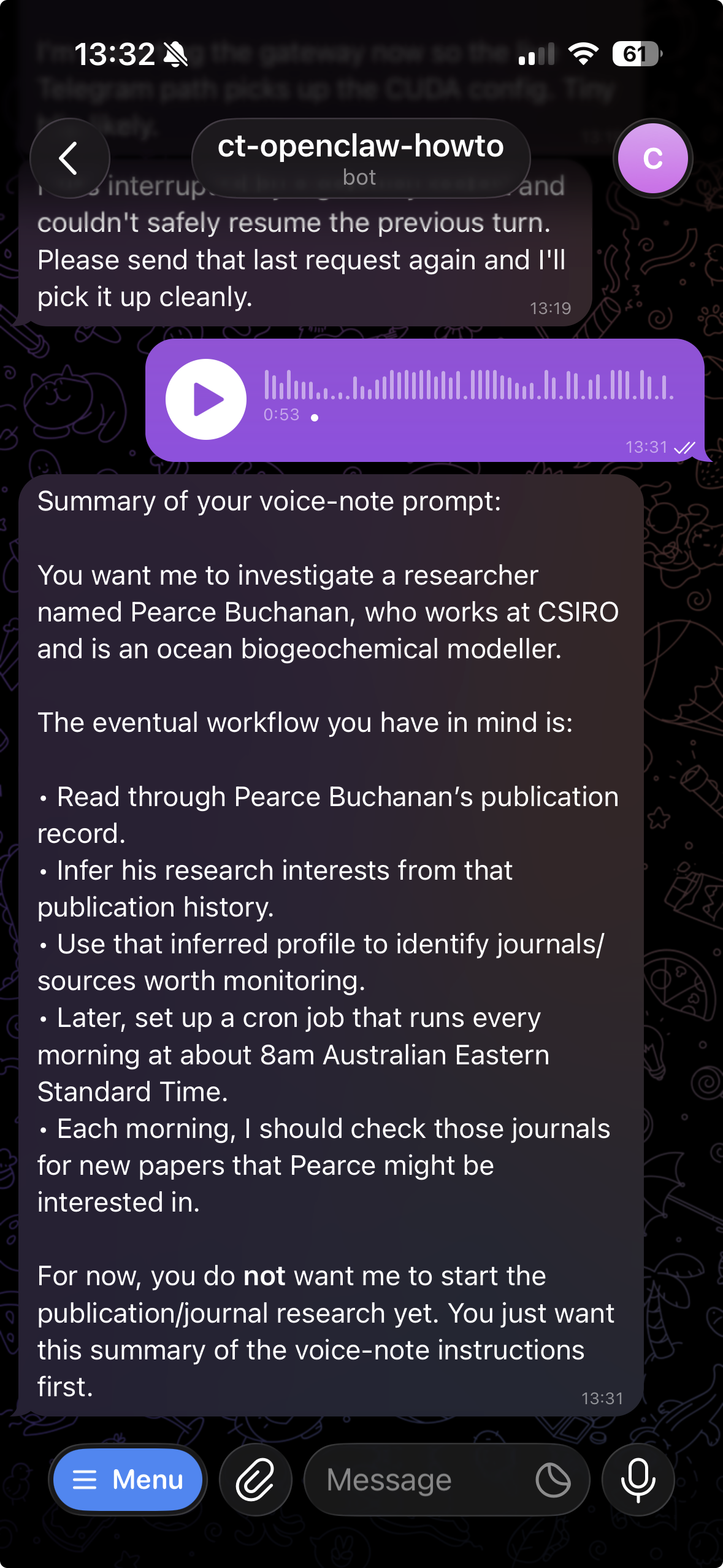
I'm getting sick of posting screenshots into this: here's what came back:
First-pass profile for Pearse J. Buchanan:
He looks like a biogeochemical oceanographer / ocean biogeochemical modeller at CSIRO. The strongest interests I’d infer from his publication record are:
• Global ocean biogeochemical model development and application, especially WOMBAT, PISCES, BEC, ROMS-BEC, and CSIRO Mk3L-COAL-style Earth system modelling. • Marine nitrogen cycling: ammonium, nitrite, nitrate, nitrification, denitrification, nitrogen fixation, nitrogen limitation, nitrogen isotopes. • Carbon cycling and climate feedbacks: biological carbon pump, CO2 drawdown, export production, palaeoceanographic carbon/nitrogen isotope modelling. • Oxygen minimum/anoxic zones and microbial controls on N cycling, including nitrite oxidation and N2O-ish microbial niche/process work. • Phytoplankton and plankton community structure under climate change, especially diatoms, regenerated production, nutrient-form shifts, and ecosystem implications. • Southern Ocean / Subantarctic productivity, mode waters, Arctic biogeochemistry, and climate-driven changes in ocean physics/chemistry/biology. • Model calibration/optimisation and reproducible model assets: surrogate ML optimisation, Zenodo model outputs/code, ensemble modelling, uncertainty/risk framing.
Sketch of what I’d do next, if you confirm:
- Build a compact “Pearse interest profile” as keyword groups, weighted from his papers: e.g. WOMBAT, PISCES, ocean biogeochemistry, nitrogen cycle, denitrification, nitrification, nitrite, ammonium, N2O, oxygen minimum zone, phytoplankton, diatoms, Southern Ocean, Subantarctic, Arctic, carbon export, biological pump, stable isotopes.
- Pick sources to monitor. I’d start with journals/feeds where his work appears or adjacent work is likely: Biogeosciences, Global Biogeochemical Cycles, Geoscientific Model Development, Nature Geoscience, Nature Communications, Science, PNAS, Geophysical Research Letters, Earth’s Future, Frontiers in Marine Science, Climate of the Past, plus preprint streams from EGUsphere, ESS Open Archive, and maybe bioRxiv for microbial ocean N-cycle stuff.
- Each morning at 8am AEST, query those sources for new papers/preprints from the last day or few days, score them against the interest profile, and send only the likely-relevant hits with a one-line reason each.
- Keep the first version conservative: better to miss some marginal stuff than spam a daily list of vaguely ocean-ish papers.
Sources used for this pass: OpenAlex author record (A5022498737), ORCID 0000-0001-7142-882X, ACCESS-NRI profile, UTas publication page, and recent papers/preprints in Biogeosciences / EGUsphere / Science.
I was pretty happy with this - here's a summary of what I voice noted back to it (generated by the robot from my voice note):
Summary of your voice note:
You approve the proposed source list and interest-profile scoring approach.
You want me to:
• Put Pearse Buchanan’s research-interest profile into a markdown note somewhere durable. • Set up an OpenClaw cron job that runs every morning. • Each run should scan the selected journals/preprint sources for new publications from the previous 24 hours. • On Monday mornings, it should look back over the weekend / past week as well. • It should score candidate papers against Pearse’s research interests. • It should return roughly a top five list for that day, with the most relevant papers and why they match.
As I was writing this sentence, it generated that cron job, and patched the note into its memory so it didn't forget:
Done.
I created the durable profile note here: /home/ct/.openclaw/workspace/notes/pearse-buchanan-interest-profile.md
And I created the OpenClaw cron job: c68286a2-7dbd-45ee-be6a-1b3ed6abbb6c
Schedule:
• Every day at 08:00 AEST • Timezone is Australia/Brisbane, because that is fixed AEST year-round • Next run: 2026-08-27 08:00:00 AEST / 2026-08-26 22:00:00 UTC
Behaviour:
• Normal days: scan the previous 24 hours • Mondays: scan the previous 7 days • Score papers against the Pearse profile • Announce up to the top five hits back to this Telegram chat • Include source links and a short match reason
Tiny caveat: if by “AEST” you meant DST-following eastern time later in the year, we should switch the cron timezone to Australia/Sydney or Australia/Hobart. Right now it is literal fixed AEST.
Looks good! See how it also figured out I was being careless with the timezone? Handy - if this was something I was doing for myself or I was super worried about the precise time in the morning the brief came in, I would have accepted its suggestion.
I told it to just do a dry run by manually triggering the cron to see what happened. This looks like it might have gotten pretty expensive - I can see it's running 30 subagents from the telegram chat. Note that since we're using the ChatGPT Plus subscription, I can't get slammed with any nasty unexpected bills - but I can hit my session limit.
If we run into session limit issues, the best way to fix them is to constrain the task more. An LLM more or less 'thinks' by muttering to itself until it comes to a decision. We don't care about any of that muttering, and don't really even see it, but we still get billed for it. By giving it a more constrained task, it doesn't have to sound out that big chain of thoughts in order to complete the task you've asked of it, and this makes it radically cheaper.
You can kind of think of this like a bit like searching the surface of a pizza. The area is going to scale as the radius squared: so searching a bigger pizza scales as the square of its size. I have no idea how high dimensional an LLM's reasoning space is, but from my experience, it's very clearly superlinear.
Anyway, I didn't hit a session limit: this is what I got back:
Pearse Buchanan literature monitor: 2026-08-26 Australia/Brisbane, Wednesday. Window searched: past 24 hours.
- Projected Effects of Climate-induced Changes in Phytoplankton biomass in the Southern South China Sea Chathumini W. Kiel et al. Biogeosciences, 2026-08-25 https://doi.org/10.5194/bg-23-5827-2026 Score: high. Uses a 3D coupled physical-biogeochemical model to project phytoplankton biomass decline under warming and nutrient depletion, including silicate.
- Biogeochemical and microbial microseepage connectivity from a deeply buried salt diapir on the Scotian Slope of Atlantic Canada Gamra Oueslati et al. EGUsphere preprint, 2026-08-25 https://doi.org/10.5194/egusphere-2026-5038 Score: high. Deep-sea microbial biogeochemistry with linked nitrogen, carbon, iron and manganese redox cycling, ammonia-oxidizing archaea, methanotrophs and sulfate reducers.
- A Threefold Increase in Observed Summertime Atmospheric Dimethyl Sulfide over the Austral Southern Ocean Caleb Mynard et al. Research Square / In Review at npj Climate and Atmospheric Science, 2026-08-26 https://doi.org/10.21203/rs.3.rs-10723345/v1 Score: medium. Southern Ocean biogenic sulfur emissions from marine algae, linked to biological productivity, mixing depth and climate-relevant aerosol formation.
- Qualitative transformations of dissolved organic matter along supra-permafrost flow: insights from Arctic subterranean estuaries Aude Flamand et al. Biogeosciences, 2026-08-26 https://doi.org/10.5194/bg-23-5901-2026 Score: medium. Arctic coastal carbon transfer paper focused on DOM/DOC transformation, redox gradients, microbial degradation and permafrost-derived carbon delivery to the ocean.
- Seasonal dynamics of dissolved organic matter along an intertidal gradient in semi-arid mangrove soils (New Caledonia) Naïna Mouras et al. Biogeosciences, 2026-08-25 https://doi.org/10.5194/bg-23-5847-2026 Score: low. Coastal blue-carbon/DOM cycling with DOC, CDOM/FDOM and microbial production, but mangrove-soil focused rather than open-ocean BGC.
No strong new OMZ, marine nitrogen-cycle, WOMBAT/PISCES/BEC, or ocean BGC model-tool papers found in this 24-hour pass.
I guess I'll have to wait and see whether Pearse finds any of these at all interesting.
Wrapping up
I was hoping this was going to be a reasonably short write up, but it has gotten waaaaay too long. There are a heap more of these random openclaw experiments into automating the drudge work that we all have to do as knowledge workers that I was hoping to fold into this.
They're going to have to wait for a follow up post.
I haven't configured any kind of setup to make commenting available on this post. I'll do that soon, hopefully. If you want to comment and/or ask questions, please either contact me directly, open an issue on this website's github repo (https://github.com/charles-turner-1/personal-homepage/), or get in touch with me whatever other way you like.
Hopefully there are some people out here that find this useful!